Throughout my experience creating my first game, I’ve learned a lot about RPG Maker MV. A lot of it I’ve wanted to share, but most of it wouldn’t create a full blog post on its own. I’ve tried to sprinkle some into blog posts, like when I talked about how useful the shadow pen is, and when I talked about how to create different facial expressions. There’s still some I’d like to talk about. Thus, today’s topic of tips and tricks.
Just know that if you’ve worked in RPG Maker MV before, you might be surprised at how clueless I was at first.
How to get two characters to walk at once in a cutscene
Trying to get two characters to walk at once in a cutscene was the bane of my existence for so, so long. And the solution was so, so simple.
RPG Maker MV has these things called events where creators can do all kinds of stuff, from playing sounds to moving other events. That last bit is important. I’ll try to keep this simple. In any given map there are dozens of events, and some of those are characters.
I’ve been creating cutscenes by moving specific events in a certain order. The cutscene event runs and when the time comes, it can move characters. But the default option is that the next part of the event will not run until the previous part is finished. I didn’t realize I could change this for way too long.
Below is the movement panel.
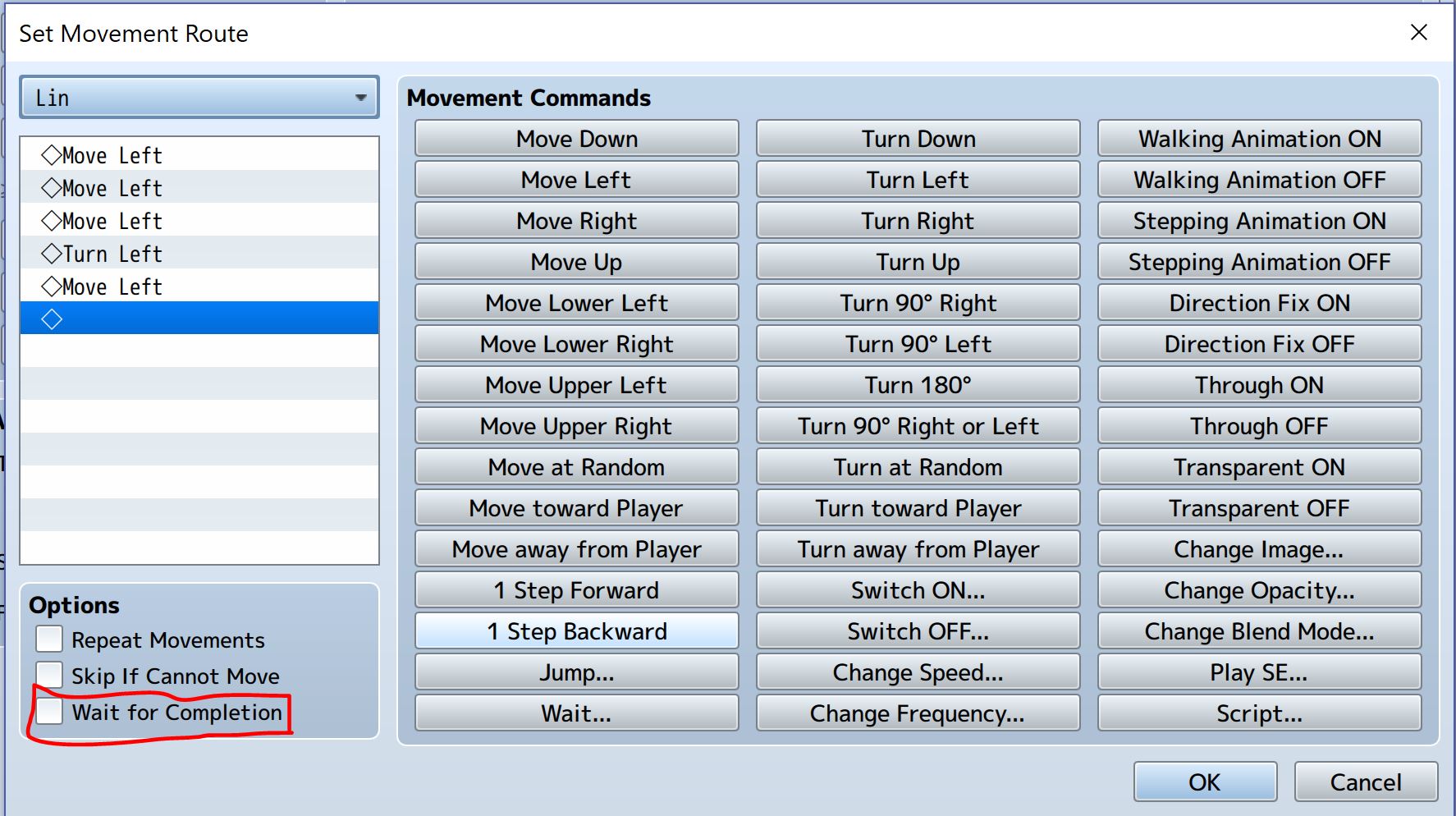
See that little red rectangle? See how there’s an option labeled “Wait for Completion”? I didn’t. Not until weeks into the game. All I had to do to get two characters to walk at the same time was to remove the check.
And this little option, the “Wait for Completion” option, exists in a few other places. Realizing that option exists has made everything much, much easier.
Changing the character starting position is important
RPG Maker MV makes it super easy to change the starting position of the main character. And this has come in handy when testing for bugs. For example, the forest map I showed off in this blog post is unreachable in the current game. I haven’t created a place for it in the overworld yet, so I have to put the character’s starting position in the forest map if I want to travel there.
Technically. I could create a way to enter it from the overworld, but my overworld is just a placeholder. And just plopping myself straight into the map was easiest for playtesting.
Always take my headphones off before playtesting
This lesson was learned the hard way. I opened the game, ready to test out a new event, and my ears were bombarded with static and the screen was white. When I threw my headphones off, I could still hear the static coming from them. I wasn’t even messing with sound, just images.
I still don’t know how exactly I managed to mess up an event badly, but I deleted the event and I’ve been a lot more cautious about playtesting.
In conclusion
There’s still a lot I have to learn about RPG Maker MV and game creation. But I’d like to think I’ve come a long way! Even if you never use these tips, hopefully you can still enjoy this post and find some humor in the odd situations I’ve gotten into.
There won’t be a blog post next week because I’ll be on spring break! But I’d love to know what you thought of this post, and please let me know what you’d like to learn about for the next blog in two weeks.

 Developing for Fun: My First Game
These are alot of great suggestions! I am pretty clueless about the process of developing games, but I really enjoyed learning more about it!
LikeLike
Nice. I worked with RPG Maker back in the day. I eventually moved to GameMaker then to Unity, but these are some good tips I’m sure I would’ve appreciated back when I first started.
LikeLike