Characters are the heart and soul of a game. They breathe life into the world and story. So when I set out to create a game, I spent a decent bit of time working on my characters. In my first post, I introduced the main cast. Now I’ll show you how I created them!
The nitty-gritty details of RPG Maker MV’s character generator
One of the things RPG Maker MV has going for it is its character generator menu. It’s surprisingly easy to use and detailed. At least for adult characters. The child character section is lacking unless you want to pay for an expansion pack.

With a few clicks of the button, a character is born! Just remember to hit “Save Settings” once you’re happy with the character. Otherwise, you’ll have to redo everything if you want to make a change. I totally didn’t make that mistake. Twice.
The menu itself is quite easy to use. There are categories (ex. face, tail, glasses) with options inside. Simply click one of the options and RPG Maker MV does the rest. And custom art can be added to the menus.

The variety of facial options also allowed me to create different facial expressions for the main cast!
Why different facial expressions are vital
It can get old fast in an RPG when the character has the same face image for every line of dialogue. It can also be distracting to see the same static face when it’s inappropriate for the current situation. For example:
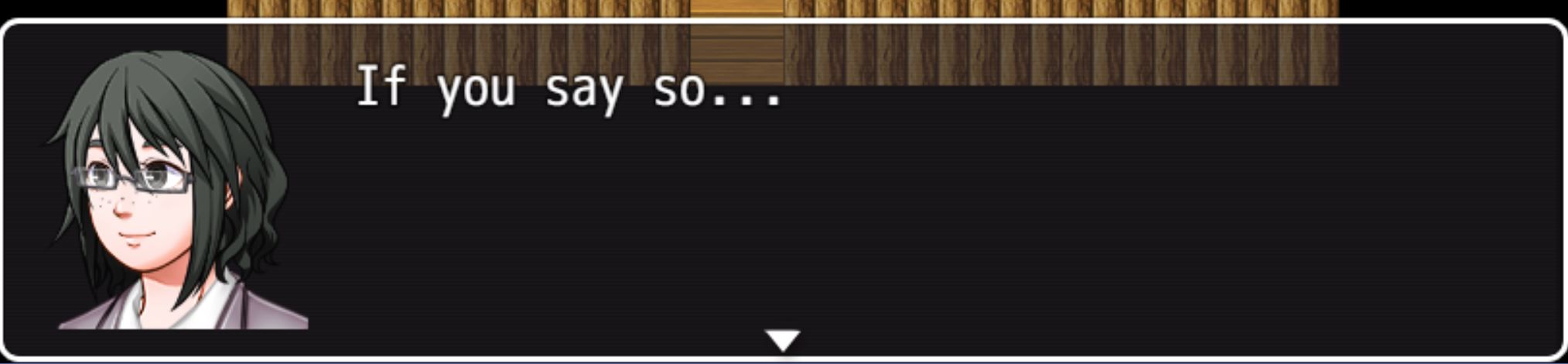
In this line, Lin is supposed to be reluctantly agreeing with Ann. But the image of her face is of her smiling. It’s distracting and confusing. Why would she smile? Isn’t she worried? The discrepancy between the dialogue and the image sticks out like a sore thumb.
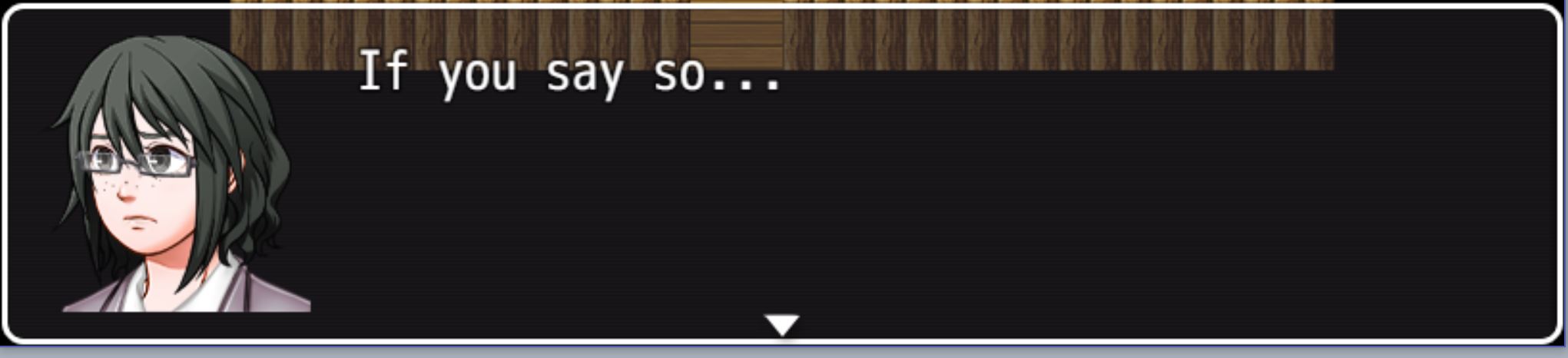
Now, look at Lin’s face. All I changed was her eyebrows and her mouth, but that’s all it takes to completely change her expression. Now the player can see the doubt on Lin’s face. It’s a small touch that adds a lot to dialogue boxes.
Now another option is just to not have the face image for the dialogue box. It’s possible to do so, and several RPGs do exactly that. But games are a visual media. I believe not using some sort of visual representation for a character’s emotions is a massive lost opportunity to bring life and character to the characters.
In conclusion
It was a lot of fun creating my characters in the character generator. Once I got the hang of it, it was one of my favorite things to mess around with. And it also adds a lot to the game!
What do you think about characters in video games? Do static face images distract you, or are you fine with them? Or do you prefer another method? Let me know in the comments below, and thanks for reading!

 Developing for Fun: My First Game
This is beyond impressive that you can do this. I thought it was a really cool and unique blog posts and I thought it was super interesting to see what is important in including with each character for you.
LikeLike
Very Interesting, never released how much details it takes to build characters!
LikeLike